At a glance
To identify a fraudulent email, you need to stay vigilant. In this article, we present the 5 questions to ask yourself.
Hackers excel at creativity when it comes to stealing your data. To achieve their goals, they often use fraudulent emails.
To identify a fraudulent email, you need to stay vigilant and ask yourself the right questions.
You know some of these messages: "Your parcel is waiting for you", "Issue with your account", "Please verify your details". Emails that seem important and urgent enough for you to open them without thinking too much.
Hackers use creativity to get you to click. An urgent email that looks official, a friend in need, a headline that concerns you "Your photo is going viral!"... How do you tell fact from fiction?
Here are a few tips for identifying a fraudulent email.
Identifying a fraudulent email in 5 steps
1. Does the message make sense?
This is the first question to ask yourself. You receive an email that looks official, or an email from someone you know, but in context, it seems out of place. Taking the example of an acquaintance, you receive a message saying:
"Can you help me? I'm stuck abroad, my handbag with all my belongings was stolen. Could you help me by sending money? I'll explain how, it's very simple, and it'll help me get home. Thanks!"
Break this message down:
- Have you spoken to this person recently?
- Do you have mutual contacts who could confirm they really did go abroad?
- Do you have their phone number or the number of the hotel where they're supposedly staying?
- Is this someone who usually contacts you this way? Their usual turns of phrase, possible spelling mistakes...
In a fraudulent email, hackers play on urgency and emotion. If you receive a message from an administration urging you to click a link to settle a bill or renew a subscription, ask yourself:
- Is this how I normally interact with this administration or company? Is it usual to receive an email about this? What are my usual channels of communication with them?
If you have any doubt at all, contact the administration or company directly by phone or by going to their website, rather than going through this message. Ask them, through their official channel, whether they really sent you a message or if it's a fraudulent email.
Certain subjects should immediately raise a red flag:
- You've won a lottery, you've won a gift voucher...
- You've been named as sole heir...
- Meet your soulmate, find a match...
There are even more devious scams: fraudulent emails that look like antivirus notifications, telling you that you've just been hacked and that you absolutely must click the link to protect yourself.
2. Does the sender's address look normal?
The devil is in the details. A fraudulent email can be identified by the sender's email address, especially when it claims to be from a company.
Normally, a company contacts you with an email that follows this structure:
subscription.be@redion.com: the person's or mailbox's name + @ + the company's domain name.
The domain name is the website address: here, for example, our commercial site is "www.redion.be". All our email addresses therefore end in .be@redion.com.
Do you receive an email from "Redion@contact.be", "contact@europ-asistance.com" or "info@Redion.be"? All these addresses may look like ours, but rest assured: we are not the senders of these messages. Don't hesitate to report it to us if you ever receive such a suspicious email!
Another point to watch out for? Look at the end of the domain name, the ".be". While you're also familiar with ".com", ".org" and ".net", be wary of .ke, .cu, .ru... Sites hosted abroad should put you on alert.
3. Is the email properly written?
 Communications from companies or administrations are generally read, reread and written by specialists. A "low-quality" fraudulent email can be recognised by its wording.
Be careful, though. Hackers adapt and evolve, and the days of emails riddled with mistakes are over. Instead, you should look at other details, such as:
- an inconsistent structure to the message;
- phrasing that isn't straightforward, overly complicated, or that looks like a poor translation;
- greetings like "Dear Customer" when you're usually addressed by your name;
- closing phrases that differ from those usually used;
- a language that isn't the one the organisation in question normally uses to address you (e.g. English or Dutch instead of French).
Anything out of the ordinary or unusual should be taken into account when identifying a fraudulent email.
4. Are the actions requested normal?
Clicking a link
A fraudulent email is pointless without a call to action: "click here to see your results", "where's my parcel?", "pay your taxes now". Everything is designed by hackers to get you to click a link, which will take you to a dubious webpage.
But how can you tell if a link is suspicious? A little tip:
- Hover your mouse over the button you're asked to click, but don't click it!
- The link's address will appear, either next to your mouse in a small white box, or at the bottom of the screen.
- Compare this address with the official website of the administration sending you this message.
Again, if you have any doubt at all, take matters into your own hands: don't reply to this suspicious email. Contact the message's supposed sender directly using the contact number from their official website, not the one given in the email.
Downloading an attachment
Other suspicious emails may invite you to download an attachment. Unless this is a normal habit of communication between you and the sender, don't click on this attachment. It may contain malware that can steal your personal data as well as infect your computer.
5. Is the email already sorted into Spam?
Inboxes are getting smarter and smarter. They automatically sort certain messages into Spam and delete them automatically after a certain time. While most emails in spam are best discarded, it's worth checking every now and then. Your inbox can sometimes be overzealous and sort perfectly legitimate emails into this category.
Example: if I believe my inbox and my spam folder, I apparently have a multitude of parcels on the way:
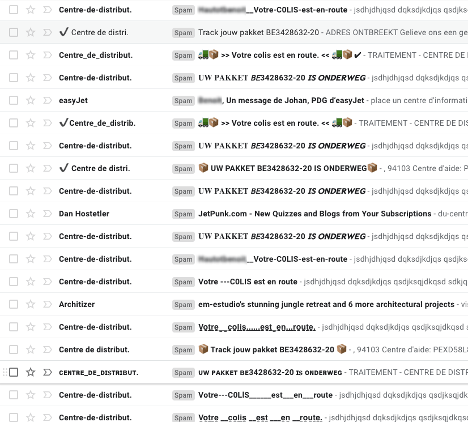
An example of a fraudulent email
Here's a suspicious email I received in my spam folder:
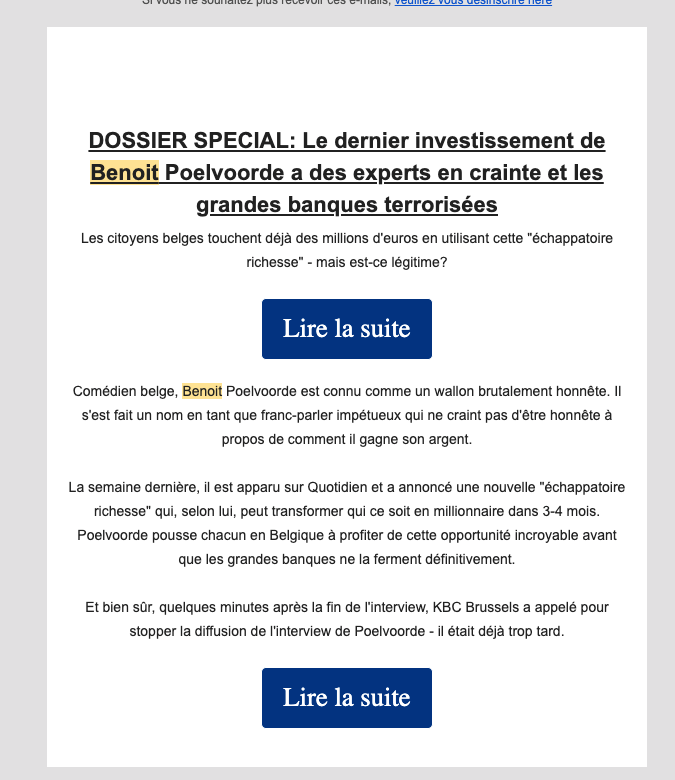
This email mimics the style of a press article, but on closer inspection, some sentences are poorly constructed and the information isn't backed up. If actor Benoît Poelvoorde had really appeared on TMC's Quotidien show, I would normally have expected to see a clip, right? And I imagine we'd have heard about this "super trick to become a billionaire"!
In fact, after a quick search, the last time the actor appeared on Quotidien was in 2019. That's not exactly "last week".
The sender's address for this suspicious email is a jumbled string of numbers and letters:

Everything is designed to get me to act: "read more". Which I'm obviously not going to do. Because even if the message is tempting, I don't fall for the trap and I delete this message straight away.
You can also try the exercise on the Safeonweb website: will you be able to spot the suspicious elements in different messages?
How to report a fraudulent email
To report a fraudulent email, follow the instructions on the safeonweb.be platform. You can also take a screenshot of the fraudulent email and send it directly to: suspect@safeonweb.be
You can also contact the Point de Contact, which will log your complaint and pass it on to the relevant services.
One last action: report this fraudulent email directly to the company whose identity was impersonated.
In brief
A fraudulent email tries, above all, to get you to click a link or download a document. In both cases, choose suspicion over haste and check whether this email looks suspicious to you using our checklist:
- Does the message make sense
- The sender's address
- The content of the message
- The actions requested
- Is the message already in spam
Don't forget: contact senders yourself if you have any doubt at all, using the usual means of communication you'd normally use with them. Have you already exchanged information, including financial details, before realising it was a scam? Immediately notify your bank and block your card by calling 078 170 170 (Card Stop).
Did you accidentally click on a fraudulent email and had your private information hacked? Our video explains, in 5 points, how to react to the theft of personal data.
Article written in collaboration with We are the Words.