At a glance
The theft of personal data isn't without consequences. We explain what you need to do if you become a victim of it.
The theft of personal data shouldn't be taken lightly. Victims are advised to file a police report ... but that's not all.
Here's our advice.
Why do people steal personal data?
Your personal data is a prime target for hackers. They can use it in many ways:
- Steal your identity by impersonating you on social media or by email, in order to scam your contacts;
- Use highly sensitive personal data to blackmail you by threatening to disclose it;
- Act on your behalf on e-commerce websites, using your credit card.
Unfortunately, there are countless ways to get hacked, which calls for constant vigilance.
If you realise that your personal information has been stolen, it's often already too late. Your data is in the hands of hackers.
How should you react to the theft of personal data?
1. File a police report for the theft of personal data
Hacking and the theft of personal data are punishable by law. The same goes for online fraud and attempted online fraud. You can therefore file a report with the Police.
The report should be filed online via the Belgian Police's Digital Desk. Don't hesitate to gather all the evidence to build your case:
- Screenshots of the link or any exchanges you may have had with the hacker. Every detail counts: note the times, days and communication platforms used;
- Proof of the hacking: social media, emails, videos (such as Netflix or Amazon Prime), e-commerce ... Every account the hacker may have had access to;
- Bank statements;
Be as precise as possible when describing what happened. Explain when and how you were in contact with the hacker, what they asked you for, how you provided the information, any steps you may have taken to try to get back in touch with them and recover your data, etc.
Alert the "Point de Contact"
The Point de Contact brings together the expertise of various federal public services. The purpose of this Point de Contact is to centralise all attempted fraud, theft of personal information, scams or swindles.
Once you've submitted your report, the relevant departments will take over. They'll be able to share your information for better case follow-up and to decide whether to take action. This report can be filed in addition to your police report.
Note: as mentioned in the Point de Contact's F.A.Q., this service is not an emergency service. That's why it's always better to file a report with the central Police desk.
2. Secure your computer with antivirus software
After the theft of personal data, it's strongly recommended to review your entire digital security setup. Restart your computer and run your antivirus software for a full check-up. It's entirely possible that your data was stolen because of malicious software installed on your machine.
We also recommend always keeping active antivirus software on your computer. Another tip: apply updates to your systems and software as soon as they're available.
These updates are how the developers of these systems fix security flaws, also known as "zero day" vulnerabilities.
Good to know: Safe & Connected assistance provides broader IT protection. It can offer you:
- A software kit that fills the gaps left by traditional antivirus programs;
- Constant monitoring of all the data you want to protect;*
- An alert system (SMS or email) alongside a monthly report on the state of risks.
3. Change your passwords
Your passwords are a line of defence against the theft of personal data. The stronger they are, the harder they are to crack. Of course, hackers do their best to crack even the most complex passwords.
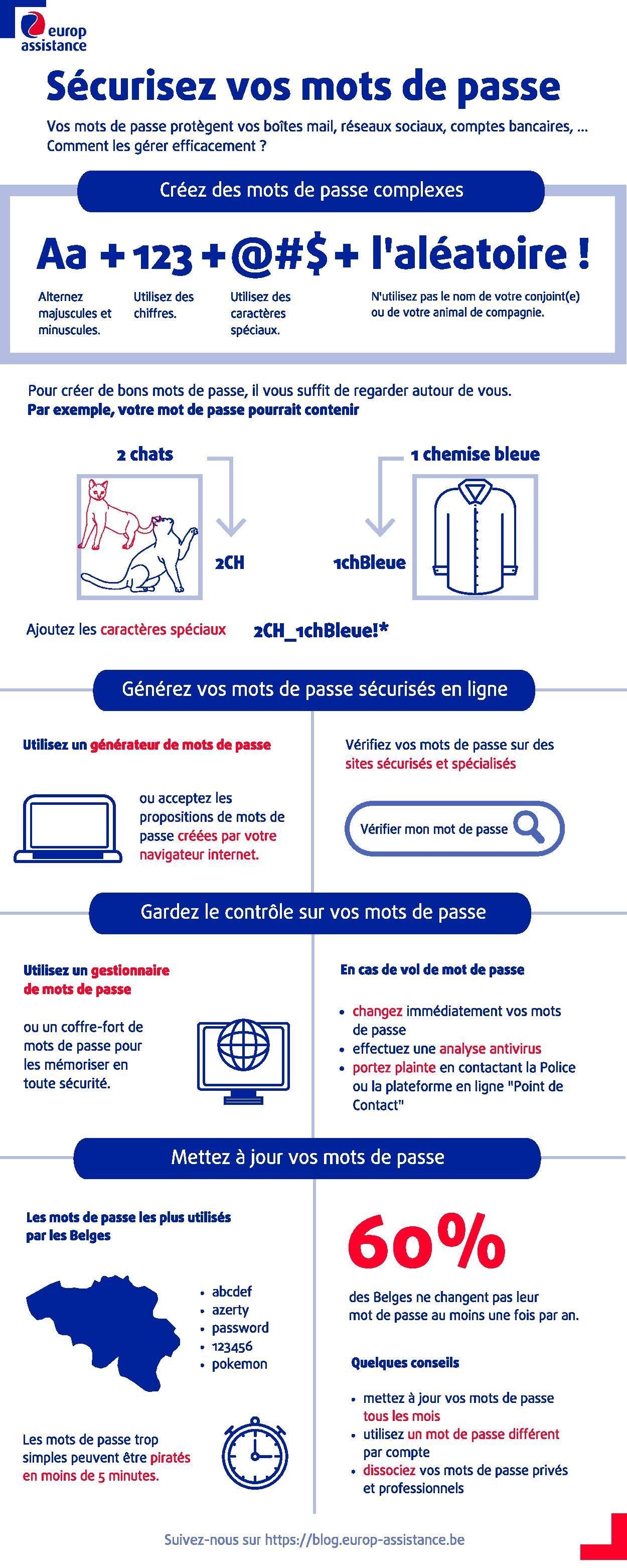
Don't wait for proof of a data theft to take action. If in any doubt, change your passwords. As we remind you in our infographic on secure passwords, a good password is made up of:
- Letters, both upper and lower case;
- Numbers;
- Special characters (@#* for example)
Don't overlook the "random" aspect of your password either. Don't use first names or birth dates that could easily be found with a quick look at Facebook.
4. Alert your contacts to warn them of the theft of personal information
Today, everything is interconnected. You use social media, instant messaging apps or emails every day. Hackers use the same channels to try to hack as many people as possible. They often exploit your trust or your interest in their message to get you to click on infected links.
Generally speaking, alert your contacts if you become a victim of hacking. Write a post on Facebook, send a group message on Messenger ... Always try to give your contacts concrete details. This alert may prompt them to be more vigilant and to check that they haven't been hacked themselves.
5. Check your bank account
Check your spending regularly. Even small amounts matter: some hackers specialise in withdrawing very small sums from many bank accounts, hoping this way to be spotted less quickly and/or avoid being reported. Keep an eye out for strange or irregular transactions. If in doubt, contact your bank and block your card.
You're normally insured if your banking details are stolen. The money stolen from you can be refunded by your bank as long as there's no negligence or fault on your part: you'll only be liable for €50.
One clarification: if your bank disputes this, it's up to them to prove the consumer's negligence in the event of the theft of personal information. It will never be up to you to prove your good faith.
You'll find other useful information in the Test Achats report on the theft of personal data.
6. Get support in the event of the theft of personal information
Have you subscribed to Redion's Safe & Connected assistance? Now's the time to contact the Helpdesk on 02/533.75.75. Our advisors will help you react to this theft of personal information.
Indeed, Safe & Connected offers you:
- legal assistance in the event of the theft of personal data,
- access to an IT protection platform if you're the victim of a cyberattack or when your computer no longer seems secure.
You'll also find some sensible tips to protect yourself against the theft of personal data in our article on remote work security.
Article written in collaboration with We are the Words.